Two Android Apps Which Can Come Handy For The Safety Of Women In India

FIGHTBACK :-
FightBack app is a unique solution that uses location based technology and enables user to fight back against crime and protect themselves in emergencies.
The user can raise panic alerts using mobile and intimate her friends and family about her location through chosen mediums like SMS and email.
This mobile app tracks user’s movement through GPS (Global Positioning System) and sends location information to the server. It also displays user’s current location on the Google map. User can send SOS alert to server by pressing panic button of the mobile application.
How it works:
• The user downloads the app and launches it.
• User registers himself using his application.
• Once registration is successful he can login using his credentials.
Help:
1. Press panic button, the center ([fB]) to send SOS.
2. Stop/Start button works as a toggle button to control GPS and sending your locations to server at a particular interval.
3. By clicking on my location button, you can see your current location on Google map.
4. By clicking on settings button, the user goes to the setting screen. Here he can add max of 5 contacts & email to whom SOS panic alerts have to be raised.
5. By clicking on exit button, you can exit from application.
6. By clicking on Red key(Cancel) or Application Key, application can be sent in background.
7. If your application is not getting correct GPS location then please go to Settings->General->Positioning->Positioning methods and enable Assisted GPS, Integrated GPS and Network based.
Dependencies:
• Phone/Device should be in online mode with a Valid SIM and GPRS connection.
HELPLS :-
HelPls (pronounced as ”Help Please”) which comes with a number of unique features like social circles and the ability to alert others without the use of Internet, something most other apps require.
The free app which is available for Android has a lot to offer. The interface is fantastically designed with a big red button in the center and the various ways to alert others around it. One can set up to 4 contacts to be alerted and the app will also send an email and post to your Facebook page.
HelPIs requires data connectivity only at the installation phase and most of the features except social circle work without it.
So say you’re in trouble, what exactly does HelPls do?
Unlike other safety apps, which would require you to dig among your apps to start the app, this app can be launched by just shaking the phone vigorously. It works even if the phone is locked.
One then clicks on the bright red button for a couple of seconds and your location is sent to multiple contacts.
The first is an SMS to 4 of your friends or family, which lets them know that you are in trouble.
The SMS would give details about your precise location with the help of a link to a map.
HelPls also enables voice recording of up to 60 seconds (duration can be changed in settings). This recording is sent to the email id entered on the application.
The app also dials an emergency contact number or Police (#100) by making a call automatically through your mobile phone within no time. The person on the other end of the line can hear the situation you are in.
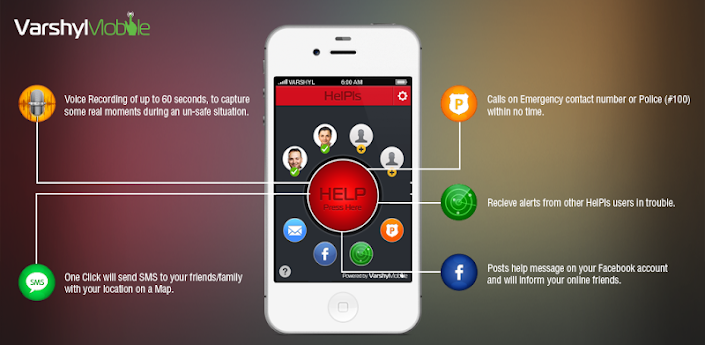
The free app which is available for Android has a lot to offer. The interface is fantastically designed with a big red button in the center and the various ways to alert others around it. One can set up to 4 contacts to be alerted and the app will also send an email and post to your Facebook page.
HelPIs requires data connectivity only at the installation phase and most of the features except social circle work without it.
So say you’re in trouble, what exactly does HelPls do?
Unlike other safety apps, which would require you to dig among your apps to start the app, this app can be launched by just shaking the phone vigorously. It works even if the phone is locked.
One then clicks on the bright red button for a couple of seconds and your location is sent to multiple contacts.
The first is an SMS to 4 of your friends or family, which lets them know that you are in trouble.
The SMS would give details about your precise location with the help of a link to a map.
HelPls also enables voice recording of up to 60 seconds (duration can be changed in settings). This recording is sent to the email id entered on the application.
The app also dials an emergency contact number or Police (#100) by making a call automatically through your mobile phone within no time. The person on the other end of the line can hear the situation you are in.
The app posts help messages on your Facebook along with your location. A useful feature since definitely someone will see and can seek help on your behalf. This does not even require a data connection. There is no Twitter integration for now but the developers plan to add it in the near future.
One of the most unique features on the app is Social Circle which allows a “Helpls” app user to lend a helping hand to other “Helpls” app user in need. If someone is in distress it sends out an alerts/push notification to other “Helpls” user in proximity (within 5km radius) for help.
One of the most unique features on the app is Social Circle which allows a “Helpls” app user to lend a helping hand to other “Helpls” app user in need. If someone is in distress it sends out an alerts/push notification to other “Helpls” user in proximity (within 5km radius) for help.
Shaking to open the app did involve a bit of vigorous shaking. An iPhone app is expected to be released over the next couple of weeks.
With a unique set of features this is could be a really useful app and we recommend you give it a try.

Comments
Post a Comment